
How this comes up in practice
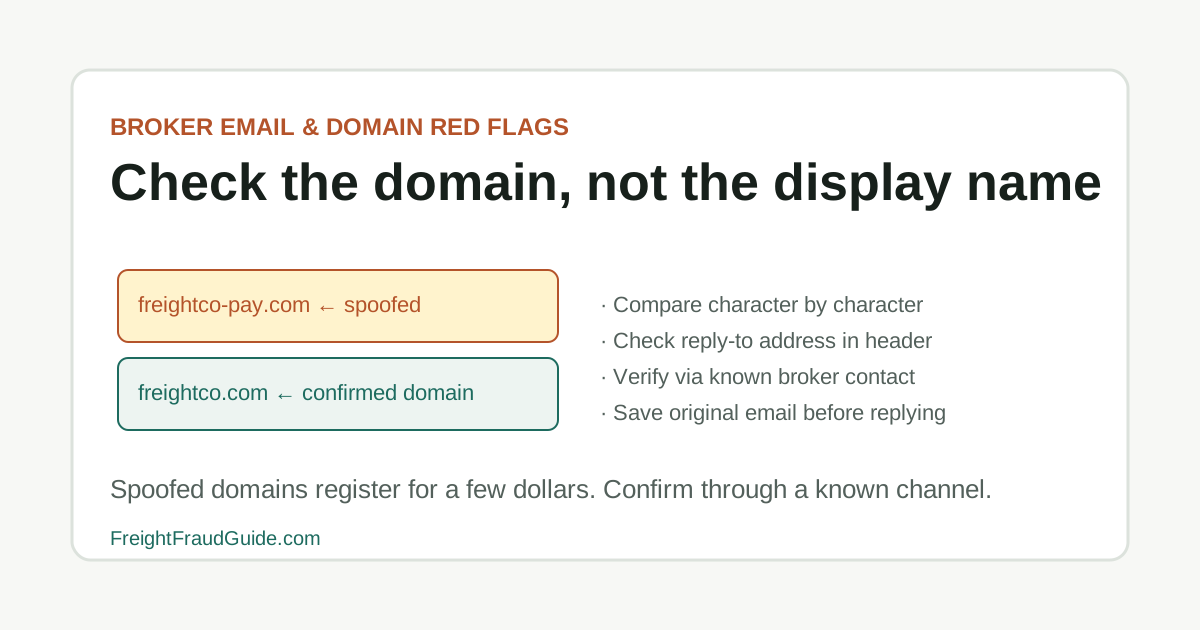
The domain substitution that causes the most problems in freight email isn't an obvious misspelling. It's one character changed in a longer domain — a hyphen added between two words, a letter transposed, or the TLD switched from .com to .net. The rest of the message looks right: the sender display name matches the expected contact, the layout is familiar, the content fits the load in progress. A routing change or shipper contact update arriving this way may go unquestioned unless someone inspects the full sender address rather than the display name. Comparing the domain character by character against a prior confirmed source — before acting on any instruction in the new thread — is the check that catches most substitutions at low cost.
Why domain checks require a different habit than document checks
Most freight verification focuses on documents — the rate confirmation, the carrier packet, the insurance certificate. Email domain review is different because the signal is in the metadata of the communication itself, not in what the message says. For adjacent verification steps, compare this with Domain Lookalike Checklist, Email Spoofing in Load Boards, and How to Verify a Freight Broker.
A spoofed domain can accompany a completely legitimate-looking rate confirmation, professional signature block, and accurate load details. The sender display name looks right. The content is contextually appropriate. Nothing in the message body flags a problem. The discrepancy is in the sending address, which requires specifically reading the full domain — character by character — rather than scanning the message.
This is also why domain verification needs to happen before acting on an instruction, not after a concern surfaces. By the time a payment change or pickup routing update has been acted on, the verification window is closed. The domain check that takes under a minute when an email arrives is far more useful than the same check done after a payment has gone to the wrong account.
Key Takeaways
- Original email with headers
- Screenshots of suspicious domains
- Rate confirmation
- Payment instruction changes
- Call-back notes
What to check before acting on a broker email
Compare the sender domain, reply-to address, signature, and phone number before opening links or accepting revised instructions.
Domain review matters most when the email asks for documents, pickup release, routing, or payment changes.
What to check before acting on a broker email checklist
- Inspect the full domain, not only the display name.
- Compare phone and email against known records.
- Avoid clicking login or document links until the source is confirmed.
Email and domain records to preserve
For this workflow, build the file around original email with headers and screenshots of suspicious domains. Keep the first version separate from later corrections so the sequence remains clear.
Email and domain records to preserve checklist
- Original email with headers
- Screenshots of suspicious domains
- Rate confirmation
- Payment instruction changes
- Call-back notes
Email signals worth a call-back
Treat "One-letter domain change" as a reason to slow the transaction and document a call-back. It is not, by itself, a public accusation or final finding.
Email signals worth a call-back checklist
- One-letter domain change
- Reply-to address differs from sender
- Urgent request to use a new portal
- Payment or routing change in a new thread
- Attachments with unusual filenames or links
Questions a suspicious email should prompt
Start with the question "Can the known broker contact confirm this email?" and tie the answer to a record, known contact, or dated instruction.
Questions a suspicious email should prompt checklist
- Can the known broker contact confirm this email?
- Why did the domain or reply-to change?
- What official record supports the phone number?
- Should this be reported to IC3 or FTC if cyber-enabled?
What an email's appearance doesn't confirm
The main trap here is assuming too much from an incomplete file. In particular: Do not assume a logo or signature block proves sender identity.
What an email's appearance doesn't confirm checklist
- Do not assume a logo or signature block proves sender identity.
- Do not assume search results show the official domain.
- Do not assume a prior thread cannot be compromised.
Official context for email and domain red flags
Use FMCSA fraud alerts as a comparison point and save the lookup date. Official status can change, and legitimate company records can be impersonated.
Official context for email and domain red flags checklist
- FMCSA fraud alerts
- FBI BEC guidance
- CISA phishing guidance
- IC3
When an email concern requires escalation
Escalate when the file reaches a concrete unresolved point, such as: The email includes payment changes. Preserve the evidence and move the question to the right internal, insurance, legal, law-enforcement, or official reporting channel.
When an email concern requires escalation checklist
- The email includes payment changes.
- The message asks for login credentials or sensitive packet data.
- A known contact denies the message.
Source Notes
Email checks should be tied to the transaction
FMCSA and cybersecurity sources warn about spoofed portals, phishing, and deceptive email patterns. Use them to justify verification steps, not to accuse a sender publicly.
FAQ
If I clicked a link in a suspicious freight email, what should I do?
If the link led to a login page or download, assume credentials or device may be compromised and contact your IT or security team. Do not use the same credentials on any freight platform. Report to IC3 if payment redirection or document requests were involved.
How common is it for a legitimate freight broker to use a free email account?
Established brokerage operations typically use business domains. A free email account from a party claiming to be an established broker is worth a call-back to verify — some very small or new operations use them legitimately, but combined with other signals like a rushed booking or changed payment instructions, it warrants confirmation before proceeding.
If I've confirmed a broker's email domain on a previous load, can I skip the check on new ones?
You can skip verifying the domain you already confirmed — but you should still compare the sending domain on any new email against the one you confirmed. A changed domain on an otherwise familiar contact is exactly the signal this check is designed to catch, and it requires no additional research beyond a character-by-character comparison.
Source References
- Fraud Alerts Federal Motor Carrier Safety Administration. primary source. Last checked 2026-06-04. FMCSA alert page for phishing attempts, spoofed portals, fake notices, SAFER impersonation, and registration-related scams.
- Internet Crime Complaint Center Federal Bureau of Investigation. primary source. Last checked 2026-05-15. Official IC3 entry point. Use the official domain directly to reduce spoofed reporting-site risk.
- Broker and Carrier Fraud and Identity Theft Federal Motor Carrier Safety Administration. primary source. Last checked 2026-06-01. FMCSA guidance on broker and carrier fraud, unauthorized USDOT use, suspicious links, SAFER phone comparison, NCCDB, OIG, FTC, and IC3 reporting pointers.
- Business Email Compromise Federal Bureau of Investigation. primary source. Last checked 2026-05-15. FBI BEC guidance for email impersonation and payment-direction risk. Useful for spoofed freight email workflows.
- Recognize and Report Phishing Cybersecurity and Infrastructure Security Agency. primary source. Last checked 2026-05-22. CISA guidance for recognizing and reporting phishing. Useful for freight email-domain and link review.