
How this comes up in practice
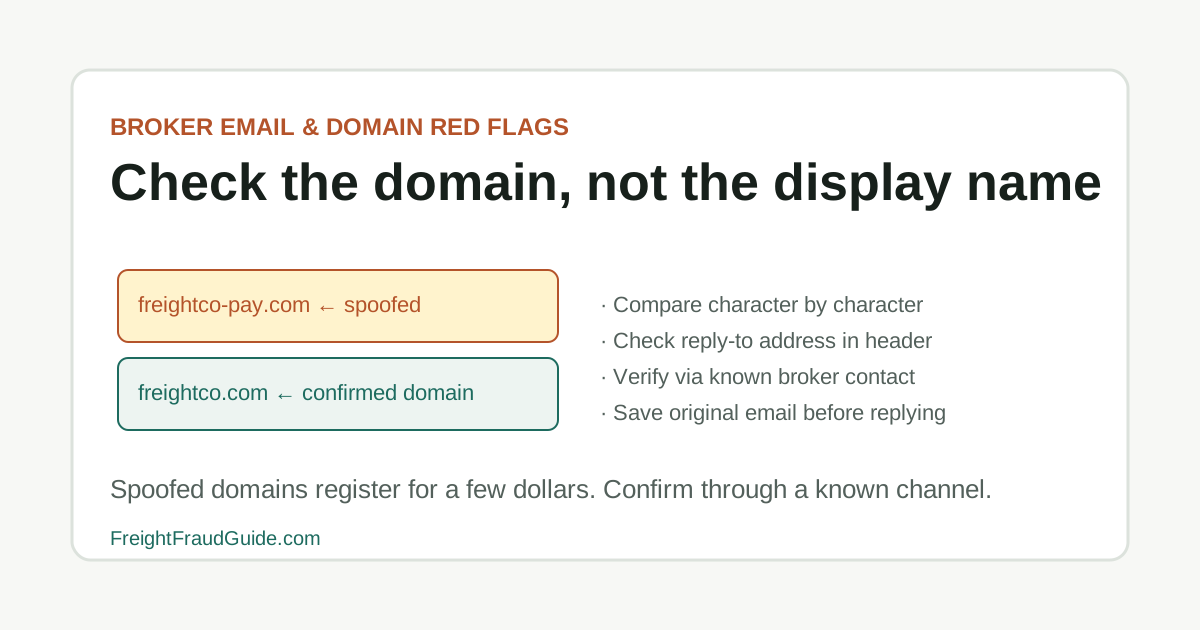
Email spoofing in freight succeeds not because targeted operations are careless, but because high transaction volume makes domain-level review feel like overhead. A domain registered that morning — one character different from the legitimate broker's — looks identical in the display name field. The message contains the right logo, the right formatting, and a load that fits the carrier's lanes. Clicking a link or forwarding a carrier packet in reply can happen before the domain difference is noticed. The review that catches it — checking the full sending domain character by character rather than the display name — costs about five seconds per message and is the single most effective check for this pattern.
How domain-level deception operates within normal transaction flow
Email spoofing in freight works within the normal flow of a transaction because it mimics the format of legitimate communications. The message structure, the timing, and the content are indistinguishable from what a legitimate broker would send. The only visible difference — a one or two character change in the sending domain — requires specifically looking for it rather than reading the message in the ordinary way. For adjacent verification steps, compare this with Domain Lookalike Checklist, Broker Email and Domain Red Flags, and FTC / FBI IC3 / OIG Reporting Checklist.
Registering a lookalike domain costs a few dollars and takes minutes. The resulting emails, carrying the target company's branding, professional signature, and contextually appropriate content, are indistinguishable from the real thing without the domain check. Most email clients display the sender's name rather than the full address by default, so the discrepancy is only visible if the recipient specifically inspects the sender field.
The defensive habit this guide describes — checking the full sending domain against a known-good source before acting on any instruction — costs about five seconds per message. It catches most lookalike variants, requires no specialized tools, and applies equally to routing changes, payment instructions, and carrier packet requests. The friction of the check is far lower than the friction of addressing what happens when it's skipped.
Key Takeaways
- Treat the load board post as a lead, not as verification.
- Confirm the broker or carrier identity through official and independently known records.
- Review the email domain, rate, pickup timing, and packet request before sending documents.
- Save screenshots of the posting and all messages before details disappear or change.
How spoofed email domains reach freight operations undetected
Email spoofing in freight doesn't require sophisticated technical tools. Registering a domain that differs by one character from a legitimate broker — freightco.net instead of freightco.com, or freight-co.com instead of freightco.com — costs a few dollars and is invisible to a reader who isn't specifically comparing the sender domain. The email body, signature block, and even logos can be copied from the legitimate company's public materials. FBI IC3 annual reports consistently identify business email compromise (BEC) — which includes spoofed-domain fraud — as one of the highest-loss cybercrime categories, and FMCSA has issued specific fraud alerts noting that spoofed portals and emails impersonating carriers and brokers are an active pattern in U.S. freight.
The targets are frequently operations that process high volumes of loads and rely on sender names rather than inspecting full domains. The attack works not because the recipients are careless, but because the volume and formatting are designed to blend into normal transaction traffic.
How spoofed email domains reach freight operations undetected checklist
- Whether the sending domain (full domain, character by character) matches the broker domain confirmed independently before this transaction
- Whether the reply-to address in the email header matches the visible sender domain
- Whether any link in the email points to the expected domain — hover to confirm before clicking
- Whether a new carrier packet request or payment instruction arrived from a domain that was registered recently
- Whether the known broker contact — reached via a a number you established independently — is aware of the email
Records to check before acting on instructions in a load board email
Load board review treats the post as a lead that still needs identity verification. In this guide, that starts with lookalike domains, reply-to changes, fake portals, and forged document threads.
Capture the account, posting details, rate, lane, domain, and packet request before the post is edited or removed. Keep the question practical: what changed, who introduced it, and which dated record can be saved before anyone acts on it.
Records to check before acting on instructions in a load board email checklist
- Treat the load board post as a lead, not as verification.
- Confirm the broker or carrier identity through official and independently known records.
- Review the email domain, rate, pickup timing, and packet request before sending documents.
- Save screenshots of the posting and all messages before details disappear or change.
What to save from an email that may have come from a lookalike domain
For email spoofing in load boards, the useful record is usually the one that shows where lookalike domains, reply-to changes, fake portals, and forged document threads first entered the file.
That record is stronger when it sits beside the dated lookup, the original message, and a note from the posting account owner or independently confirmed company contact. It is weaker when it has been renamed, cropped, forwarded without headers, or separated from the transaction timeline.
What to save from an email that may have come from a lookalike domain checklist
- Record the name, number, document field, contact path, or instruction tied to lookalike domains, reply-to changes, fake portals, and forged document threads.
- Keep the original file or message before saving a marked-up copy.
- Add the source URL, access date, sender identity, and who confirmed or contradicted the detail.
Questions that verify the sending domain before any response goes out
Hold the booking, dispatch, pickup, or payment decision when the file depends on a new contact path, revised document, missing official record, or mismatch that no one has explained.
The pause should be narrow and written down: the field that does not line up, the source used to check it, and the person or channel that must answer before the work continues.
Questions that verify the sending domain before any response goes out checklist
- Name the exact field or instruction that does not line up.
- Save the document version or message that introduced the mismatch.
- Check the official or independently known source before using the new detail.
- Record the confirmation result before continuing.
What a familiar display name and matching content don't confirm about the sender
Save screenshots early because load board details and message threads can disappear after the other party changes course. In this guide, that starts with lookalike domains, reply-to changes, fake portals, and forged document threads.
The useful file shows how the posting identity connected, or failed to connect, to the broker or carrier records behind it. Keep the question practical: what changed, who introduced it, and which dated record can be saved before anyone acts on it.
What a familiar display name and matching content don't confirm about the sender checklist
- Load board posting screenshot
- Profile or account details
- Message thread and email headers when available
- Rate confirmation and packet request
- Official broker or carrier lookup results
When a domain difference is reason enough to stop before responding
Load board questions should verify the party behind the account before documents or pickup details are shared. In this guide, that starts with lookalike domains, reply-to changes, fake portals, and forged document threads.
A strong answer comes through a known company contact, not through the same profile that created the concern. Keep the question practical: what changed, who introduced it, and which dated record can be saved before anyone acts on it.
When a domain difference is reason enough to stop before responding checklist
- Who controls the posting account?
- Does the email domain match the known company domain?
- Can the broker or carrier confirm the posting independently?
- Why is the rate, timing, or packet request unusual?
Further context on email spoofing patterns
A marketplace profile can be compromised or reused. Treat reputation signals as context, not identity proof. In this guide, that starts with lookalike domains, reply-to changes, fake portals, and forged document threads.
When a posting feels unusually urgent or generous, slow down enough to preserve the evidence and verify the entity. Keep the question practical: what changed, who introduced it, and which dated record can be saved before anyone acts on it.
Further context on email spoofing patterns checklist
- Do not assume a load board account proves identity.
- Do not send packet documents before confirmation.
- Do not assume a high rate is harmless.
- Do not move to a new thread without preserving the original.
When the posting warrants a report
Escalate when the posting identity cannot be confirmed or when the account appears to be part of spoofing, phishing, or identity misuse. In this guide, that starts with lookalike domains, reply-to changes, fake portals, and forged document threads.
Use platform reporting, known company contacts, IC3, FTC, or FMCSA resources according to the facts and the records you saved. Keep the question practical: what changed, who introduced it, and which dated record can be saved before anyone acts on it.
When the posting warrants a report checklist
- The account contact denies a call-back through known records.
- The domain or payment path changes unexpectedly.
- The post requests sensitive packet details before verification.
- The pattern suggests account takeover, spoofing, or identity misuse.
Source Notes
Source context for Email Spoofing in Load Boards
For load-board scam topics, FMCSA L&I confirms broker authority and entity identity behind a posting. SAFER confirms carrier status. FBI IC3 handles cyber-enabled fraud including email spoofing, account takeovers, and domain lookalike schemes targeting load board users. Load board platform verification is a starting point — not a substitute for independent official-record checks.
FAQ
What's the fastest way to check if a freight email domain is legitimate?
Compare the sending domain character by character against the broker's domain from a previously confirmed source — not from the current email. If you have no prior confirmed domain, look up the broker's website through an independent search and compare.
Can a spoofed freight email domain be reported to law enforcement?
Yes. If a spoofed domain was used to obtain money, documents, or freight fraudulently, IC3 is the appropriate federal reporting channel. FTC handles deceptive business practices. Preserve the complete email with full headers before filing — the headers contain technical information that investigators use and can't be recovered from a screenshot alone.
What's the quickest way to check if an email domain was newly registered?
A WHOIS lookup at a tool like ICANN WHOIS or whois.domaintools.com shows the registration date. A domain registered within days or weeks of the email you received is a strong indicator of a spoofing operation. Save the WHOIS result alongside the email as part of the documentation.
Source References
- Fraud Alerts Federal Motor Carrier Safety Administration. primary source. Last checked 2026-06-04. FMCSA alert page for phishing attempts, spoofed portals, fake notices, SAFER impersonation, and registration-related scams.
- Internet Crime Complaint Center Federal Bureau of Investigation. primary source. Last checked 2026-05-15. Official IC3 entry point. Use the official domain directly to reduce spoofed reporting-site risk.
- Internet Crime Complaint Center Complaint Form Federal Bureau of Investigation. primary source. Last checked 2026-05-15. Official IC3 complaint form for cyber-enabled incidents. Not a substitute for emergency response.