
How this comes up in practice
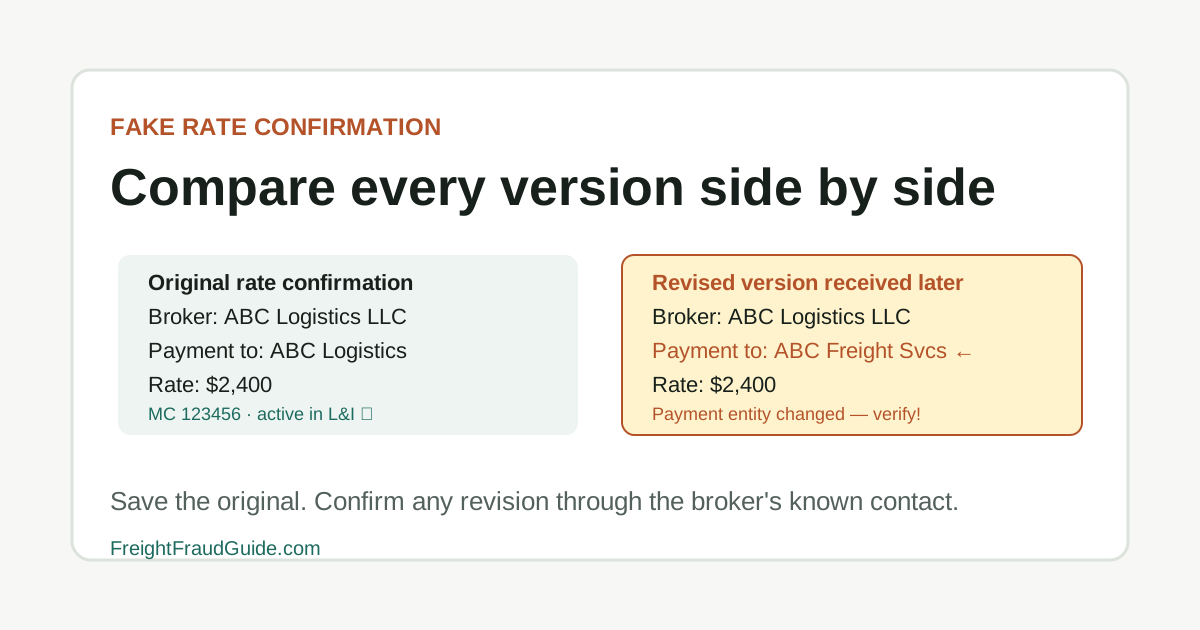
A revised rate confirmation that arrives mid-load can look nearly identical to the original while carrying a substitution in the payment section: a different broker entity, a new remittance address, or an MC number belonging to a different company. The original rate confirmation is still in the file. Catching the change requires comparing both versions — the sending domain on the revision against the one on the original, and the payment terms against the broker's L&I record. If the revision arrives from a slightly different domain and changes payment direction, both details require confirmation through a contact established before this transaction, not through the revision itself. Preserving both originals without renaming keeps the comparison possible.
How document alteration appears in rate confirmations
Rate confirmation forgery in freight doesn't require sophisticated technical skills. A PDF can be edited to change a company name, payment entity, or MC number while preserving the original formatting, logo, and signature block. The resulting document is often indistinguishable from the original on visual inspection. For adjacent verification steps, compare this with Domain Lookalike Checklist, and What Documents to Save Before Pickup.
The pattern that produces the most risk is a revised rate confirmation arriving after the original has been accepted. The revision may come from a slightly different email domain, through a new contact, or with a changed payment section — but the rest of the document matches the load already agreed to, which reduces scrutiny.
The file discipline that catches this is comparing the sending domain between the original and the revision, and treating any revision that changes a payment entity or MC number as requiring a confirmation call to the broker's known contact before acceptance. Original PDFs should be preserved without overwriting, because the comparison between an original and a revision is often the only way to establish that a change was made.
Key Takeaways
- Original attachment
- Email headers
- All revisions
- Load posting
- Confirmed call-back notes
What to compare when a revised document arrives
Compare the rate confirmation file, sender, attachment name, metadata if available, and revised versions.
A fake document often appears with a rushed pickup, new email address, or missing transaction detail.
What to compare when a revised document arrives checklist
- Preserve the original file.
- Compare the document to official records.
- Confirm through a known contact.
Rate confirmation records to preserve
For this workflow, build the file around original attachment and email headers. Keep the first version separate from later corrections so the sequence remains clear.
Rate confirmation records to preserve checklist
- Original attachment
- Email headers
- All revisions
- Load posting
- Confirmed call-back notes
Revision signals worth investigating
Treat "Altered logo or layout" as a reason to slow the transaction and document a call-back. It is not, by itself, a public accusation or final finding.
Revision signals worth investigating checklist
- Altered logo or layout
- Different broker entity in payment terms
- Missing pickup number
- New sender domain
- Conflicting carrier name
Questions a revised rate confirmation should prompt
Start with the question "Who created this rate confirmation?" and tie the answer to a record, known contact, or dated instruction.
Questions a revised rate confirmation should prompt checklist
- Who created this rate confirmation?
- Why was a revised file issued?
- Which official contact can verify it?
- Has the shipper received the same carrier information?
What a revised document doesn't confirm
The main trap here is assuming too much from an incomplete file. In particular: Do not assume visual polish means authentic.
What a revised document doesn't confirm checklist
- Do not assume visual polish means authentic.
- Do not assume a forged document names the actual wrongdoer.
- Do not assume a screenshot is enough evidence.
Official records to compare against revisions
Use FMCSA fraud alerts as a comparison point and save the lookup date. Official status can change, and legitimate company records can be impersonated.
Official records to compare against revisions checklist
- FMCSA fraud alerts
- IC3 for cyber-enabled document spoofing
- Known broker and shipper contacts
When a document concern requires escalation
Escalate when the file reaches a concrete unresolved point, such as: Pickup is scheduled with unresolved file conflicts. Preserve the evidence and move the question to the right internal, insurance, legal, law-enforcement, or official reporting channel.
When a document concern requires escalation checklist
- Pickup is scheduled with unresolved file conflicts.
- Document appears tied to spoofed email.
- Freight has already moved under disputed documents.
Source Notes
Forgery concerns need preserved originals
Keep the original PDF, email headers, and revision timeline. Do not overwrite suspicious files while trying to clean up the load folder.
FAQ
How do I preserve a potentially forged rate confirmation without destroying evidence?
Save the original PDF without editing or converting it. Save the email in its original format with full headers. Do not delete the original while trying to organize copies. Export the full message rather than just a screenshot if using a web email client.
How can I tell if a PDF rate confirmation has been altered?
Visual comparison against a prior version is the starting point — differences in fonts, spacing, logo placement, or formatting. A confirmed callback to the issuing broker's known contact is the more reliable check: a legitimate broker can verify the document they sent and produce their own copy of the original to compare.
Should I report a suspected forged rate confirmation to law enforcement?
If freight has moved under a document you believe is forged and the situation involves potential cargo theft or financial loss, law enforcement contact is appropriate. IC3 is the right channel if there's a cyber-enabled element. Preserve the original file and complete email with headers before filing anything — reporting before preserving can create evidence gaps that complicate the record.
Source References
- Fraud Alerts Federal Motor Carrier Safety Administration. primary source. Last checked 2026-06-04. FMCSA alert page for phishing attempts, spoofed portals, fake notices, SAFER impersonation, and registration-related scams.
- Internet Crime Complaint Center Federal Bureau of Investigation. primary source. Last checked 2026-05-15. Official IC3 entry point. Use the official domain directly to reduce spoofed reporting-site risk.
- Broker and Carrier Fraud and Identity Theft Federal Motor Carrier Safety Administration. primary source. Last checked 2026-06-01. FMCSA guidance on broker and carrier fraud, unauthorized USDOT use, suspicious links, SAFER phone comparison, NCCDB, OIG, FTC, and IC3 reporting pointers.
- Business Email Compromise Federal Bureau of Investigation. primary source. Last checked 2026-05-15. FBI BEC guidance for email impersonation and payment-direction risk. Useful for spoofed freight email workflows.